We hear the term every day: cloud computing. But what exactly does that mean? Because it’s a relatively new business model in the computing world, and because it impacts your business in myriad ways, let’s take a look at what it is and how it can work for you.
The cloud is just a metaphor for the internet. Think of those old-style flow-charts that showed the Internet as a fluffy white cloud; that’s how we got the terminology.
For the simplest explanation, Dictionary.com defines cloud computing this way: “Internet-based computing in which large groups of remote servers are networked to allow sharing of data-processing tasks, centralized data storage and online access to computer services or resources.”
The National Institute of Standards and Technology, or NIST, offers a bit more technical detail in its definition: “Cloud computing is a model for enabling ubiquitous, convenient, on-demand network access to a shared pool of configurable computing resources (e.g., networks, servers, storage, applications and services) that can be rapidly provisioned and released with minimal management effort or service provider interaction.”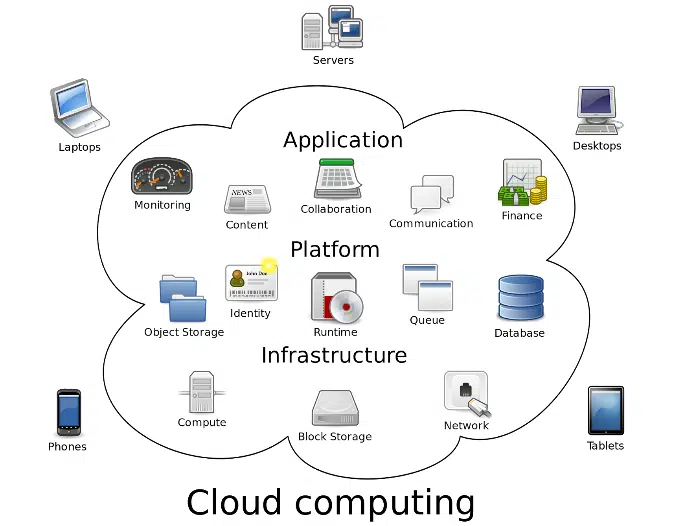
Common Examples
Simply put, cloud computing means that users are connecting to applications that run on a set of shared or pooled servers, rather than running on a single dedicated server.
Whether you’re using these services for business or personal needs, you’re essentially outsourcing by having these computer services provided by someone else, which allows you to focus on what you need to get done.
You probably use cloud computing every day without even realizing it. If you use an online email service like Gmail, Outlook or Hotmail, you’re using the cloud. If you work on shared documents through Google Drive or Microsoft OneDrive, you’re using the cloud. If you’re simply sharing music from your iTunes library, you’re using the cloud.
Types of Cloud Computing: IaaS, PaaS, SaaS
 There are three primary types of cloud computing, with each one encompassing the elements of the previous ones to offer a wider array of services:
- Infrastructure as a service (IaaS): This type of cloud computing gives you an instant infrastructure. You’re essentially renting the hardware, which is managed by the provider. It includes the physical data center, networking security and firewalls, and servers and storage.
- Platform as a service (PaaS): This type of cloud computing encompasses the infrastructure you’d get with IaaS, but adds more services, like operating systems, development tools, database management and business analytics.
- Software as a service (SaaS): This type of cloud computing encompasses everything you’d get with IaaS and PaaS and adds the software components. This allows users to connect to and use cloud-based apps over the internet.
Uses of Cloud Computing
For a business, the ways to use cloud computing are limited only by your imagination. You can use the technology to do all sorts of things, such as:
- Store, back up and recover data
- Host websites and blogs
- Stream audio and video
- Create new apps and services
- Analyze data for patterns and make predictions
- Deliver software on demand
Through extensive experience with cloud computing and relationships with clients as their trusted partner, V2 Systems is positioned to help guide you to successful results in leveraging cloud computing solutions adapted to your business.
Give us a call at 703-396-6120 to discuss V2 Systems’ Cloud Solutions. Check out how our cloud solutions deliver software over the internet and eliminate the need for you to install and run these applications on your local devices. Isn’t it time for you to simplify your maintenance and support?
Since 1995, Manassas Park, VA-based V2 Systems has employed local systems administrators, network engineers, security consultants, help desk technicians and partnering companies to meet a wide range of clients’ IT needs, from research, to implementation, to maintenance. Concentrate on your VISION…We’ll handle the TECHNOLOGY!