In an earlier blog, we talked about how organizations transitioning to Office 365 can do so smoothly with minimal disruption to their day-to-day business. For those who plan on going ahead with the switch, today’s blog looks at the available plans and options regarding the entire Office suite. This should help you figure out which is the best path for your company to take regarding this popular cloud-based software solution.
List of Office 365 Licenses
There are multiple Office 365 licenses available and navigating the differences between each one can quickly get overwhelming. Here are your main choices if you’re a small to mid-sized organization:
- Office 365 Business Essentials
- Office 365 Business
- Office 365 Business Premium
- 365 Business
- Office Enterprise (annual plans)
Which Office 365 License Should You Go With?
 The base price for each plan can typically range anywhere from $5 to $30 per user, and that can get rather expensive for larger organizations. On the other hand, if you rely on certain functionalities like Rights Management or cloud PBX, bundling these services together into one package could potentially save your company more money overall.
Ultimately, when deciding on a plan, you should choose one that’s flexible enough to accommodate the inevitable growth of your business. For example, both the Office 365 Business plans and Enterprise plan are available for organizations with fewer than 300 employees. However, Business plans are available month-to-month, while Enterprise requires a year-long commitment (though at a slightly reduced monthly cost).
What Does Each Office 365 License Offer?
If you’re a small to mid-sized organization (up to 300 employees), your best option will likely be one of the Business packages. Here, we’ll take a closer look at each plan.
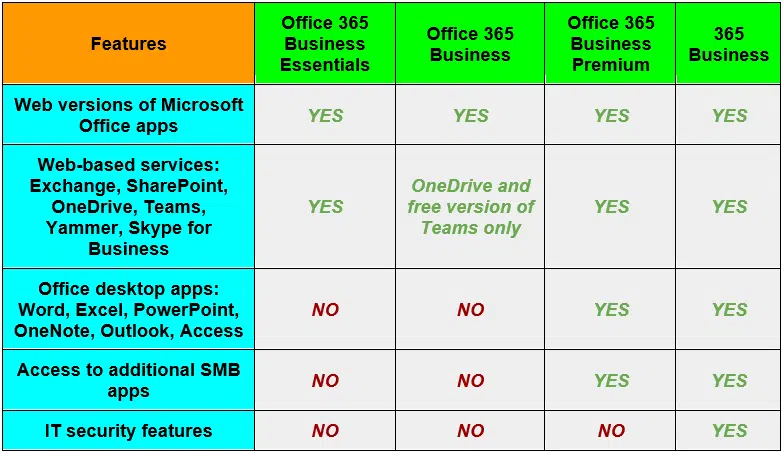 In addition to the four Business packages listed in the above chart, there are multiple Enterprise options to choose from, which are Microsoft’s annual-only licenses. While the Business plans are great for companies just starting out or that only require limited functionality, organizations with more than 300 employees, or anyone simply looking for a more robust solution, you may find that Enterprise plans are a more viable solution. We’ll gladly explain those options as well.
Regardless of the size of your company, V2 Systems is happy to walk you through each and every feature and price point of all options available to you. Together we can help you determine the best solution for your situation.
Since 1995, Manassas Park, VA-based V2 Systems has employed local systems administrators, network engineers, security consultants, help desk technicians and partnering companies to meet a wide range of clients’ IT needs, from research, to implementation, to maintenance. Concentrate on your VISION…We’ll handle the TECHNOLOGY!