One thing that we use frequently, and that users frequently have trouble wrapping their heads around, is virtualization. This is commonly used on servers, and to a lesser extent, workstations. It is used because it is a way to evenly distribute hardware resources, and provide service separation. What does all that mean?
Around 2005, the first dual core CPU was introduced. For the first time, computers got more powerful through parallel processing rather than sequential processing. These new chips were not much faster at executing a single application than the CPUs before them, but they could run multiple applications much faster than earlier CPUs. As time progressed, software developers looked for ways to distribute computing more and more, to take advantage of the advances in parallel computing. Computer virtualization was born.
Virtualization is the process of running one or more virtual computers on one piece of hardware. The RAM, CPU, hard drive, network card, and all other devices in the hardware computer (referred to as the Host) are shared with a program that mimics those resources to a virtual machine. Using the virtual machine, it works and runs as if it was a separate computer, but it is still software located on the Host. 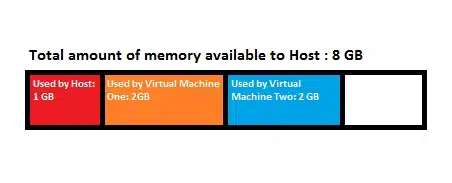 As the diagram shows, doing this lets someone utilize the resources of the hardware much more efficiently than before virtualization.
One of the things we run into many times is problems where a single program is messing up, but in order to fix it, we have reboot the server and disconnect everyone. Virtualization helps solve this problem. Instead of having one server that stores files, keeps track of users and user permissions via Active Directory, and provides internet access, we have three servers. One hardware server, with two virtual machines. One virtual machine stores files, while the other one handles Active Directory and internet access. That way, if a problem requires a reboot, we can just reboot the affected server and leave the other alone (unless, of course, the problem is on the Host!). This is called service separation.
In some cases, service separation is required. Microsoft requires Active Directory to be on a different server than an Exchange Server, for example. Microsoft also recommends SQL (a database program) be on a separate server from Active Directory.
With desktop computers getting more powerful, virtualization can be done on them as well. The most common example is Windows 7 XP Mode. XP Mode is a virtual machine that runs Windows XP that works with Windows 7 computers. It is a great way to run old programs that may not be compatible with the changes in Windows 7.